Why Verifiable Credentials matter
How can a trading partner be certain that you are the legitimate owner of a product identification and authorised to place a product on the market? Today, trading partners often have to manually verify whether a GTIN (EAN barcode) is valid or linked to the correct company. This takes time and creates uncertainty. With Verifiable Credentials, this verification becomes simple, reliable and automatic.
What are Verifiable Credentials?
A Verifiable Credential (VC) is a digitally signed, cryptographically secured proof that confirms a specific claim. The claim is issued by a trusted source and can be independently verified by any trading partner. The GS1 VC proves that your company is the registered licence holder of a specific GTIN range.
How do I download Verifiable Credentials?
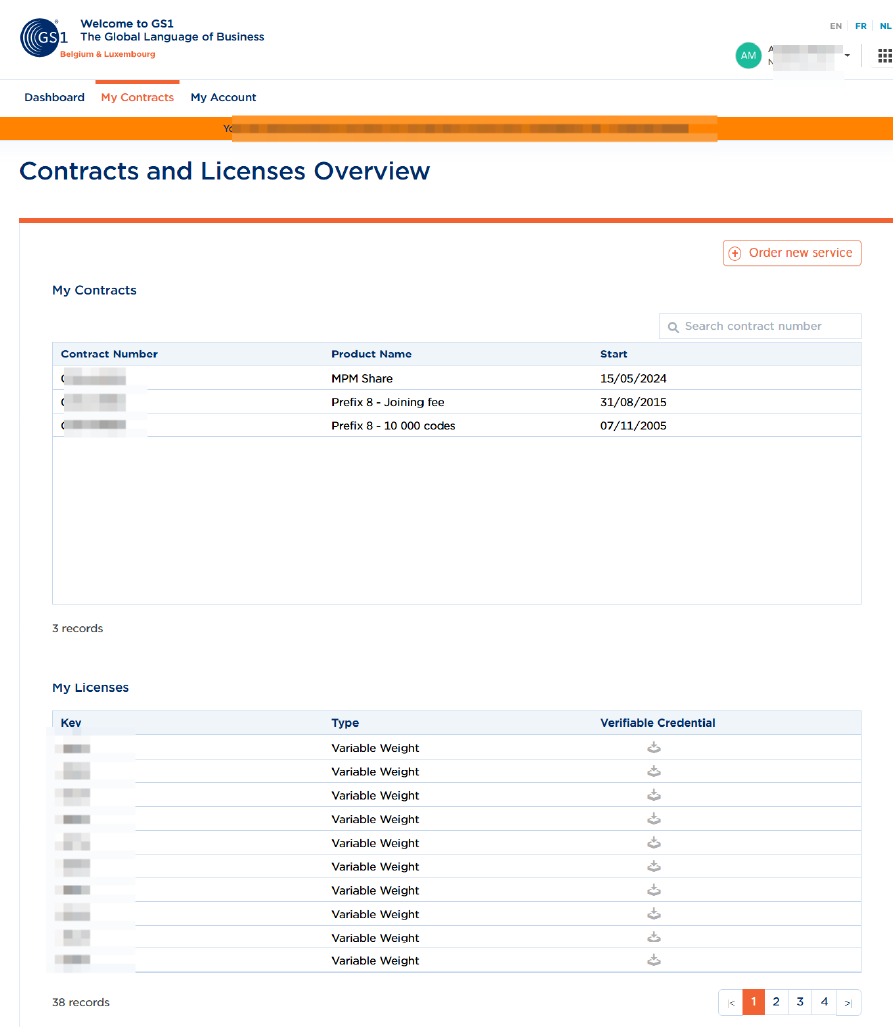
- In My GS1, go to My Contracts.
- At the bottom of the page, under My Licences, you can download the Verifiable Credential (VC) for your product.
- You will download a JWT file. This file is the Verifiable Credential, or VC for short.
- Next, upload the file to the designated field provided by your trading partner.
- Attention! Only share this code with trusted trading partners through their secure web portal. Also, do not modify the code in the document.
How do I verify a Verifiable Credential?
- Log in to MyGS1.
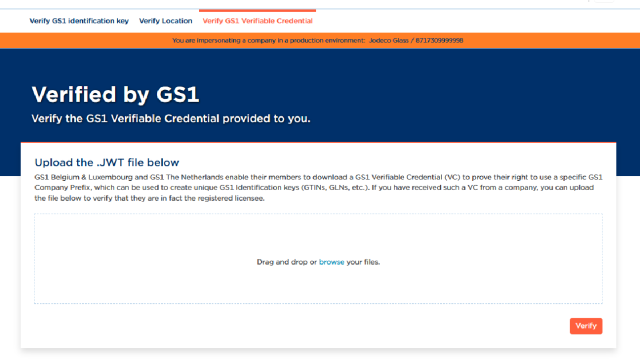
- Go to Verified by GS1.
- In the navigation bar at the top of the page, click ‘Verify GS1 Verifiable Credential’.
- Upload the document.